Universal Smartphone Lens Kit: Wide, Macro & More
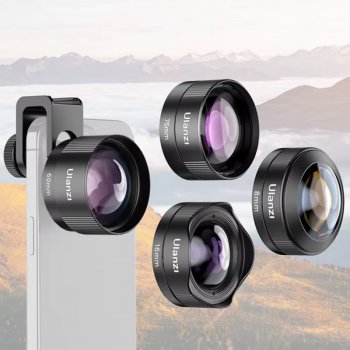
Universal Smartphone Camera Lens Kit: Small Add-Ons, Big Creative Range
A phone camera is already powerful, but sometimes a scene calls for more: a wider view for travel, a closer look for details, or a different perspective for content that stands out. A universal smartphone camera lens kit is built for those moments—simple attachments that expand what a phone can capture without switching devices. Our team put together this guide to help you understand what these kits are best for, what to check before buying, and how to get clean results day-to-day.
What a universal lens kit helps unlock
- More variety from the same phone: New angles and framing options without upgrading your handset.
- Better problem-solving on the go: Fit more into a tight room, get closer to a subject, or create a distinct look for social posts.
- Faster experimentation: Try multiple styles (close-up, wide, “portrait-like” background separation) in a single shoot session.
- A lightweight add-on for creators: Useful for product listings, food shots, travel highlights, and quick behind-the-scenes content.
If you want an easy way to start exploring these looks, our Universal Smartphone Camera Lens Kit keeps several options in one place so you can switch perspectives quickly and stay consistent across content batches.
Common lens types to look for (and what they’re used for)
- Wide-angle: Captures more of the scene; helpful for travel, interiors, group shots, and real estate-style framing.
- Macro/close-up: Focuses very near the subject; great for jewelry, textures, crafts, plants, and small product details.
- Telephoto-style add-on: Tightens framing from farther away; useful for events, candid shots, and simplified backgrounds.
- Fisheye/creative distortion: A bold, curved perspective for action, street scenes, and playful content.
- Filters (when included): Can shift mood and contrast; best used lightly so skin tones and product colors stay natural.
Match the shot to the attachment to look for
| What you want to capture | Attachment to look for in a lens kit | Quick setup tip |
|---|---|---|
| A whole room, skyline, or group photo | Wide-angle | Keep the phone level to reduce stretched edges |
| Texture, stitching, coins, skincare, crafts | Macro/close-up | Add more light and hold steady—tiny shakes show up |
| Food and products with a clean background | Telephoto-style add-on | Step back slightly, then reframe for a natural look |
| High-energy, stylized social content | Fisheye/creative lens | Center the subject; edges will distort by design |
| A brighter outdoor look (where allowed) | Filter accessory | Use sparingly; check skin tones and whites before posting |
Fit and compatibility checks before attaching anything
- Camera placement matters: Make sure the clip/adapter aligns cleanly over your main camera lens and doesn’t block flash or sensors.
- Case thickness: Bulky cases can stop the lens from sitting flush. If your alignment is off, remove the case for shooting.
- Multi-camera phones: Choose which camera you’re using (main vs. ultrawide). Switching cameras may require repositioning the attachment.
- Stability over pressure: A good fit holds steady without squeezing so hard that it tilts the lens or shifts mid-shot.
A quick reality check: most “universal” kits are designed to work broadly, but perfect results come from careful alignment. Take ten seconds to seat the clip straight and you’ll avoid most corner darkening and edge softness.
Quick setup workflow for sharper, cleaner shots
- Clean first: Wipe your phone camera glass and the add-on lens with a microfiber cloth before each session.
- Align carefully: Watch the screen edges for dark corners (vignetting). Nudge the lens until the frame clears.
- Lock focus/exposure when possible: Tap-and-hold on the subject to reduce focus hunting, especially for close-up work.
- Add light instead of boosting ISO: For macro and indoor shots, more light usually looks better than heavy noise reduction.
- Use a timer or support: A small tripod, grip, or stable surface improves results more than most edits.
Macro tip that saves time: move the phone slowly toward the subject until it snaps into focus, then pause and shoot a short burst. With close-up work, the “sweet spot” is small, and extra frames help you catch it.
Care, storage, and keeping the glass clear
For general cleaning guidance, Apple’s care recommendations are a solid baseline (Apple Support — How to clean your Apple products), and many lens-care principles are consistent across camera gear (Nikon — Cleaning your camera and lenses).
Best-use ideas for creators, sellers, and everyday moments
If you’re building a repeatable posting routine for your shop or side hustle, our team also recommends pairing your shoot schedule with a lightweight planning system like From Dream to Done: The Ultimate Business Goal-Setting Checklist so content creation doesn’t feel random week to week.
The Universal Smartphone Camera Lens Kit at KeyTreasureHub
When you’re ready to start exploring wider scenes and tighter details with one compact setup, you can find it here: Universal Smartphone Camera Lens Kit.
FAQ
Will a universal smartphone camera lens kit fit any phone?
“Universal” usually means the kit uses a clip or adapter that can work across many phone models, but real-world fit depends on camera placement, case thickness, and multi-camera layouts. If alignment is tricky, removing a bulky case and using the main camera typically improves results.
Why are there dark corners or blurry edges after attaching a lens?
This is usually vignetting from misalignment: the add-on lens isn’t centered, the clip is tilting the lens, or you switched to a different camera module without repositioning. Re-center the lens over the main camera, reduce digital zoom, and clean both surfaces to restore edge clarity.
How do you clean add-on phone lenses safely?
Use a clean microfiber cloth and gentle, lens-safe cleaning methods, and avoid harsh chemicals that can damage coatings. Clean your phone’s camera glass too, then store the add-on lens in a pouch or case to limit dust and scratches.













Leave a comment