Clear Wireless RGB Mechanical Keyboard for Clean Desks
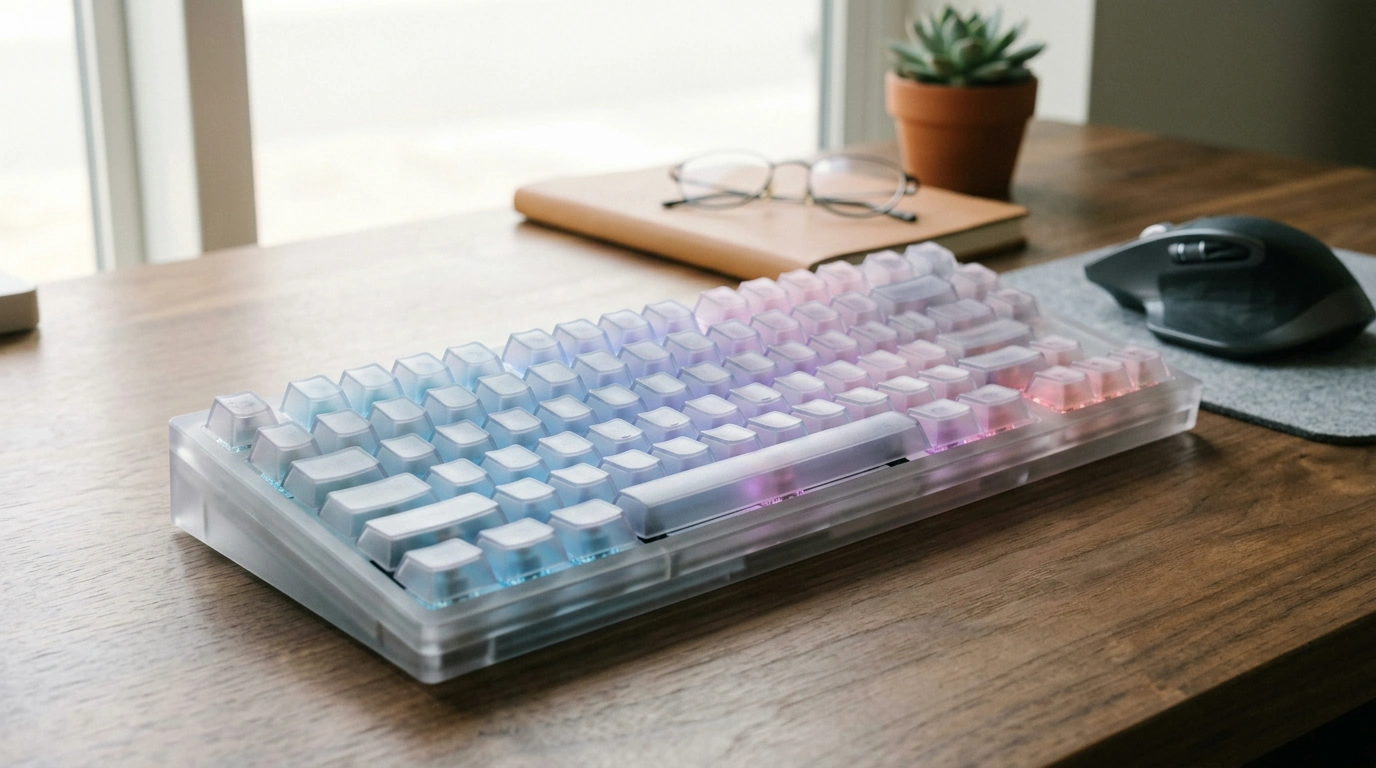
Wireless Transparent RGB Mechanical Keyboard: Clear Design, Clean Setup, Color on Demand
A transparent keyboard does more than look futuristic—it turns your lighting into part of the build and keeps the desktop feeling open instead of bulky. Our wireless transparent RGB mechanical keyboard is made for a cleaner setup, satisfying key feel, and lighting that can shift from a subtle glow to a full-on color show depending on your mood.
What makes a transparent mechanical keyboard different
Transparent boards stand out because the design isn’t just cosmetic—it changes how your setup feels day to day.
- Brighter, more even-looking RGB: A clear housing lets light travel and reflect through the chassis, so colors read as more “filled” across the board rather than spotty hotspots.
- Matches almost any desk style: A clear chassis works with minimal desks, gaming battlestations, and studio corners without forcing one specific theme.
- Mechanical-style feedback for long sessions: That distinct keypress response supports typing, gaming, and repetitive work where consistency matters.
- Wireless freedom: Fewer cables means fewer visual distractions and an easier time rearranging your desk.
Wireless convenience without losing the “mechanical” experience
Wireless is about more than aesthetics. It changes how you move, store, and share your workspace—without giving up the control many people want from mechanical-style typing.
- Make your desk more flexible: Slide the keyboard forward for gaming, back for note-taking, or angle it to match your wrist position.
- Cleaner actuation feel helps accuracy: A more defined press can reduce accidental keystrokes and help you keep rhythm when you’re moving fast.
- Easier in shared spaces: If you pack up nightly, swap between rooms, or rotate between devices, wireless makes it quicker to reset your space.
- Fewer snag points: A tidy desk surface leaves more room for wide mouse movements, controllers, audio gear, and notebooks.
Wireless keyboards commonly use Bluetooth-based connections; Bluetooth standards are maintained by the Bluetooth SIG, which publishes the core specifications that many devices follow.
Bluetooth Core Specifications (Bluetooth SIG)
RGB that complements the room, not just the game
RGB is most useful when you can dial it up or down based on what you’re doing. With a transparent chassis, even simpler lighting modes can look intentional—like part of your decor instead of an afterthought.
- Adjustability is the win: Keep it calm for late work sessions, then switch to brighter effects when you want the keyboard to be a centerpiece.
- Color can support routines: Use one palette for focus, another for casual browsing, another for weekend gaming nights.
- Lighting becomes functional decor: In creator setups and small rooms, ambient light can make the space feel “finished” without adding clutter.
Quick guide to choosing a lighting vibe
| Lighting vibe | Best for | What it changes on the desk |
|---|---|---|
| Low glow / single color | Late-night work, shared rooms | Reduces visual noise while keeping keys readable |
| Mid brightness / slow shifts | Everyday use, relaxed browsing | Adds atmosphere without distraction |
| High brightness / dynamic effects | Gaming, streaming, showcase setups | Turns the keyboard into a centerpiece |
Where this keyboard fits best
- Gaming setups: Responsive feel, clear visibility under backlight, and a clean wireless look that doesn’t crowd your mouse space.
- Work-from-home desks: A polished, modern aesthetic that still feels fun—without running extra cables across the desk.
- Dorm rooms and compact desks: Transparent design keeps the workspace visually lighter than darker, blocky peripherals.
- Gift-ready upgrades: Transparent + RGB is a straightforward win for someone building their first battlestation or stepping up from a basic keyboard.
How to choose the right feel and layout (before hitting buy)
A keyboard looks great in photos, but day-to-day comfort comes down to a few practical decisions.
Fast checklist before checkout
| Question | If the answer is “yes” | Prioritize this |
|---|---|---|
| Is desk space tight? | Mouse area feels cramped | A layout that leaves breathing room |
| Do you share a room? | Noise matters at night | Smoother, quieter typing feel |
| Is lighting part of the setup? | You want the keyboard to pop | Transparent look + RGB flexibility |
| Do you move between devices? | Laptop + desktop rotation | Simple wireless pairing routine |
Mechanical Keyboard Switch Guide (MechanicalKeyboards.com)
Care and setup habits that keep it looking crisp
ANSI/HFES 100 Human Factors Engineering of Computer Workstations
Shop our team’s picks
- Wireless Transparent RGB Mechanical Keyboard — a clear, RGB-forward board built for a cleaner wireless setup.
- From Dream to Done: The Ultimate Business Goal-Setting Checklist (Printable PDF) — a simple way to plan projects if your desk doubles as a work zone.
- Smart Moves: Save Money & Pay Bills Like a Pro — a practical read if you’re organizing your budget for a full setup refresh.
FAQ
How does a wireless mechanical keyboard pair with devices?
Enable the keyboard’s wireless mode, then open your device’s Bluetooth/wireless settings and select the keyboard from the list. If a confirmation prompt appears, follow it to complete pairing; after that, many devices will reconnect automatically when both are on and in range.
Will the RGB lighting work in wireless mode?
Yes—RGB lighting is designed to work while you’re using the keyboard wirelessly. Keep in mind that brighter settings and more dynamic effects typically use more power, so lowering brightness or choosing calmer patterns can help extend time between charges.
Is a transparent keyboard harder to keep clean?
Transparent designs can show dust and fingerprints sooner, but they’re not difficult to maintain with a simple routine. Regular dusting plus an occasional wipe with a microfiber cloth and gentle cleaner keeps the clear finish looking crisp.











Leave a comment